Business Virtual Assistant Guide for U.S. Founders (2026)
September 16, 2026


A business virtual assistant is a remote professional who runs administrative, calendar, inbox, and operations work for a U.S. team. Typical all-in costs range from about $7 per hour nearshore to $25 to $50 per hour in the U.S., and the decision is which hiring model gives you the right balance of control, speed, and risk.
Before the cost comparison, one correction to how this role is usually budgeted. Most guides price a business VA as a 40-hour week. That is not what U.S. companies are actually buying. Across the 25 business-VA roles opened through Virtustant in the first half of September 2026, 12 of the 23 that stated a schedule were part-time — and the most common shape was not a reduced week but a fixed daily window: 10am–2pm ET, 9am–1pm PT, 9am–11am ET, 5pm–9pm CT. Several were 10 to 20 hours a week. 22 of those 23 were anchored to a named U.S. time zone rather than to the assistant’s local hours.
That changes the budget question. If more than half of real demand is a part-time window, the right comparison is not annual salary against annual salary — it is cost per covered hour in the window you actually need staffed. A 40-hour framing will overstate every option on the page, and it will overstate the U.S. in-house option most.
My view is straightforward. Freelance is cheapest, traditional agencies are simplest administratively, and nearshore managed staffing is usually the strongest balance for a stable role that must operate during U.S. business hours. The right answer depends less on the label “VA” and more on how much process ownership, oversight, and replacement coverage the role requires.
A business virtual assistant handles repeatable work that keeps a U.S. company moving. That usually includes calendar coordination, inbox triage, meeting notes, data entry, CRM updates, customer follow-up, research, invoice preparation, and light operations support. The remote professional typically works from their own location through cloud tools, with the exact schedule shaped by the team's workflow.
The cost boundary matters before you start interviewing. In 2026, all-in hourly rates commonly cluster between about $7 nearshore and $25 to $50 for U.S.-based generalists. Agency-managed talent generally lands toward the higher end because the price can include sourcing, screening, payroll administration, account management, and replacement support. Treat these as planning ranges, not a promise for every role.
A business VA works inside company systems and supports commercial outcomes. They might maintain HubSpot records, coordinate customer appointments, prepare weekly operating reports, or follow up on unpaid invoices.
A personal VA serves the individual rather than the operating system of the company. Their work may include travel planning, household administration, personal errands, or private appointment management. The skills can overlap, but the access requirements and success measures are different.
An executive assistant operates at a higher level of judgment. The role can include gatekeeping, board preparation, complex stakeholder management, confidential correspondence, and executive decision support. That scope can command $70K or more in salary, so substituting a business VA for an executive assistant is usually a scope error, not a cost-saving strategy.
Operator rule: Give a business VA repeatable work with a clear definition of done. Keep strategic judgment calls with the founder, department lead, or properly scoped specialist.
If you're comparing role definitions, review the remote roles we staff before writing the job description. For executive-level scope, a career hub for executive assistants can help clarify how the position differs from general administrative support.
This guide is for U.S. founders and small operations leads who spend more than five hours a week on administrative work that someone else could own. If the work repeats, can be documented, and doesn't require your judgment at every step, it's a strong candidate for delegation.
The best business VA job descriptions describe deliverables, not vague availability. A typical SMB role can combine six task buckets, although the mix should change as the company's workload changes. The percentages below are a practical planning model for scoping a role, not a universal staffing benchmark.
| Task Bucket | Weekly Time Share | Example Deliverables |
|---|---|---|
| Calendar and meeting coordination | Roughly 20% | Block focus time, schedule prospect calls, resolve conflicts, prepare agendas |
| Inbox triage and drafting replies | Roughly 25% | Sort messages, draft responses, flag urgent issues, route requests |
| Data entry and CRM hygiene | Roughly 15% | Update HubSpot or Pipedrive, remove duplicate records, format weekly KPIs |
| Research and vendor outreach | Roughly 10% | Compare vendors, collect quotes, build prospect or supplier lists |
| Customer support and order processing | Roughly 15% | Answer approved requests, process orders, track returns and follow-ups |
| Bookkeeping preparation and invoice follow-up | Roughly 15% | Organize receipts, prepare invoice data, chase late payments |
Calendar work is more than moving meetings around. A capable VA protects focus blocks, checks meeting context, confirms attendees, and prevents avoidable scheduling errors. Inbox work should follow rules for urgency, customer status, and escalation, rather than turning the VA into a human forwarding machine.
CRM hygiene creates value in the background. The VA can standardize fields, log activity, update deal stages, and format a weekly dashboard so the sales lead sees clean information instead of spending the morning repairing records. Research may involve vendor comparisons, competitor tracking, or outreach to suppliers with a defined script.
Customer support and bookkeeping preparation need tighter boundaries. The VA can handle approved replies, order status requests, receipt organization, and invoice reminders, but should escalate unusual refunds, disputes, financial discrepancies, and sensitive customer issues.
Common tools include Google Workspace, Slack, HubSpot, Pipedrive, Calendly, QuickBooks Online, Notion, Front, and Help Scout. A social team may also use a LinkedIn post scheduler, but the VA still needs a content calendar, approval rules, and escalation path.
A good VA flags rebalancing when one bucket expands. If customer support consumes the time previously reserved for CRM work, the manager should change the scope, add capacity, or remove lower-value tasks. A virtual assistant company can help match the role to specific workflows rather than treating every assignment as generic administration.
A business VA is not one hiring decision. Choose among three operating models based on cost, control, speed, and who carries the risk: direct freelance, traditional agency, or nearshore managed staffing.
| Criterion | Freelance | Traditional Agency | Nearshore Managed |
|---|---|---|---|
| All-in hourly cost | Lowest | Highest, often with agency markup | Moderate |
| Day-to-day control | Direct | Usually direct, with agency support | Direct through a managed engagement |
| Time to hire | Variable | Moderate | Fast when the provider has a vetted bench |
| Replacement risk | Founder carries it | Agency may provide limited replacement | Provider carries defined replacement support |
| Compliance and payroll burden | Founder carries much of it | Simpler for the client | Consolidated through the provider |
| Time-zone overlap | Depends on candidate | Depends on candidate | Usually designed around U.S. overlap |
Freelance is the right fit when the work is repeatable, the manager can recruit and train directly, and the company wants the lowest hourly cost. You can hire through Upwork, OnlineJobs.ph, a referral, or your own network, then set the process and work with the person doing the job. The trade-off is clear: if the freelancer disappears, underperforms, or becomes unavailable, the founder owns the replacement search, documentation, and transition.
Traditional agencies reduce administrative work. They may handle contracts, payroll, and candidate sourcing. Assume the agency adds a margin on top of the base rate and validate the actual number against the specific contract — published ranges vary too widely to plan from. Many agencies focus on filling a requisition, so the client must test whether the provider understands the workflow, tools, approval rules, and expected output rather than presenting candidates.
Nearshore managed staffing fits a company that wants one accountable operating relationship without building payroll infrastructure in another country. Latin American business hubs commonly sit within UTC-3 to UTC-6, and sources report four to eight hours of same-day overlap with standard U.S. business hours. That overlap is what makes live standups, customer calls, and same-day feedback practical instead of aspirational.
Colombia, Peru, Ecuador, and Panama sit at UTC-5 year-round, with no daylight saving shift, so they track U.S. Eastern Time in winter and fall one hour behind it in summer. Mexico and Costa Rica sit at UTC-6, aligned with U.S. Central Time. For a role built around a fixed daily window, that alignment matters more than a small hourly-rate difference — a four-hour Eastern window only works if the assistant is awake for it every day of the year, including the two weeks a year when U.S. clocks move and theirs do not.
Match the model to the function. Choose freelance for a documented, low-risk queue. Choose an agency when administrative simplicity matters and the contract defines replacement support. Choose nearshore managed staffing when the role needs recurring coordination, U.S. time-zone overlap, and a provider responsible for continuity.
Use a compare remote staffing agencies checklist that asks who owns screening, payroll, compliance, manager support, and replacement. The cheapest model stops being cheap when the founder becomes the recruiter, trainer, payroll coordinator, and continuity plan.
Hourly price is only one budget input. Approve a business VA by total cost of ownership, including management time, onboarding, tools, payroll administration, benefits where applicable, equipment support, compliance handling, and the cost of replacing a weak hire.
The planning ranges below are author's planning estimates based on Virtustant 2026 pricing, not market statistics. Monthly figures assume 40 hours per week and annual figures use 2,080 hours, purely so the three models are comparable. As the pipeline data above shows, most real business-VA roles are not 40 hours — scale each row down to the window you are actually staffing before you compare anything.
| Hiring Model | All-in Hourly Rate | Monthly at 40 Hours | Annual at 2,080 Hours |
|---|---|---|---|
| U.S.-based generalist | $25 to $50 | $4,300 to $8,300 | $53K to $104K |
| Freelance international | $6 to $12 | $1,000 to $2,100 | $12.5K to $25K |
| Nearshore LATAM managed | $7 to $15 | $1,200 to $2,600 | $15K to $31K |
Use the table to compare operating models, not just hourly prices. A direct freelancer can cost less per hour, yet still require founder time for sourcing, skill testing, contracts, payments, time tracking, backup coverage, and replacement. A U.S.-based hire can add payroll taxes, benefits, equipment stipends, paid time off, and management overhead beyond the stated wage.
Ask the agency to state its margin in writing rather than inferring it from a blended rate. Check the agreement for onboarding charges, minimum hour blocks, notice periods, and termination windows. A lower rate tied to a long commitment can cost more than a higher rate with flexible replacement terms.
Your approval sheet should include the virtual assistant hourly rate, the manager's weekly hours, ramp period, software access, quality-control work, and likely replacement effort.
Approve the model that produces the lowest cost per correct, on-time output. Freelance fits a documented queue with low coordination needs. Agency support fits teams paying for administrative simplicity. Nearshore managed staffing fits recurring work where continuity and accountable coordination justify the added provider cost.
Delegation fails when a founder transfers responsibility before the workflow is visible. Start with low-risk, repeatable work, give the VA enough context to execute it, and expand access only after the person demonstrates reliable judgment.
Week 1 focuses on observation and controlled execution. Assign calendar management, inbox triage, and meeting notes. Use read-only access where possible, let the VA draft rather than send sensitive replies, and review the work daily.
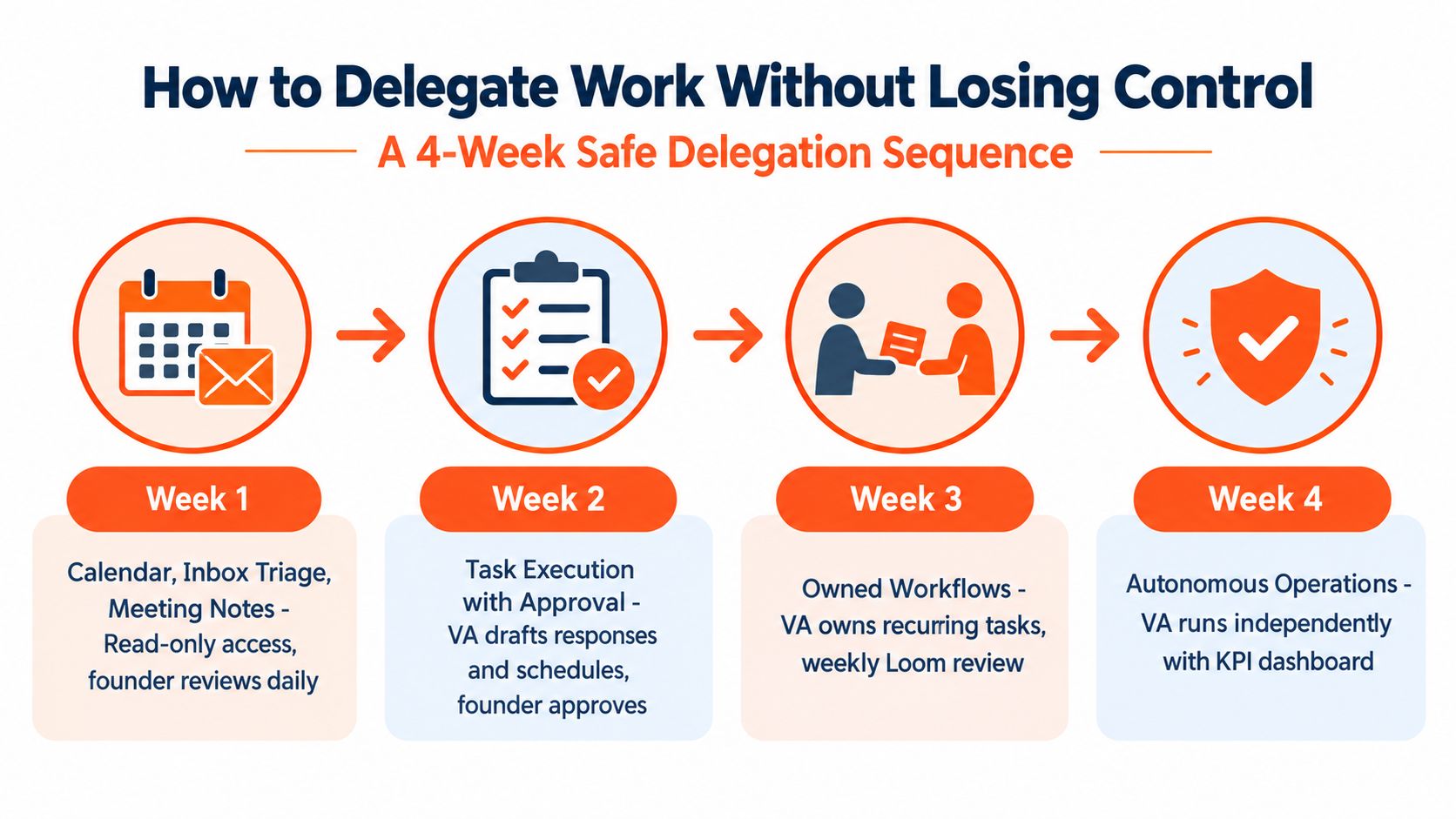
Week 2 moves into structured system work. Give access to existing data-entry workflows, CRM hygiene, and standardized reporting. The VA should update records according to written rules, while the founder approves exceptions and checks a sample of completed work.
Week 3 adds research and finance preparation. Assign vendor outreach, list building, receipt organization, and invoice preparation. The VA can chase missing information, but shouldn't approve payments, alter financial controls, or make commitments on the company's behalf.
Week 4 introduces approved customer support. Provide response templates, escalation categories, refund boundaries, and examples of acceptable judgment. A weekly dashboard should show completed tasks, exceptions, aging items, and any recurring source of rework.
Don't delegate contract signing, bank transfers above a defined internal threshold, hiring decisions, or anything touching legal or HR during the first 90 days. Those activities require authority, confidentiality, and context that a new VA hasn't earned yet.
Practical rule: Delegate the repeatable. Keep the irreplaceable.
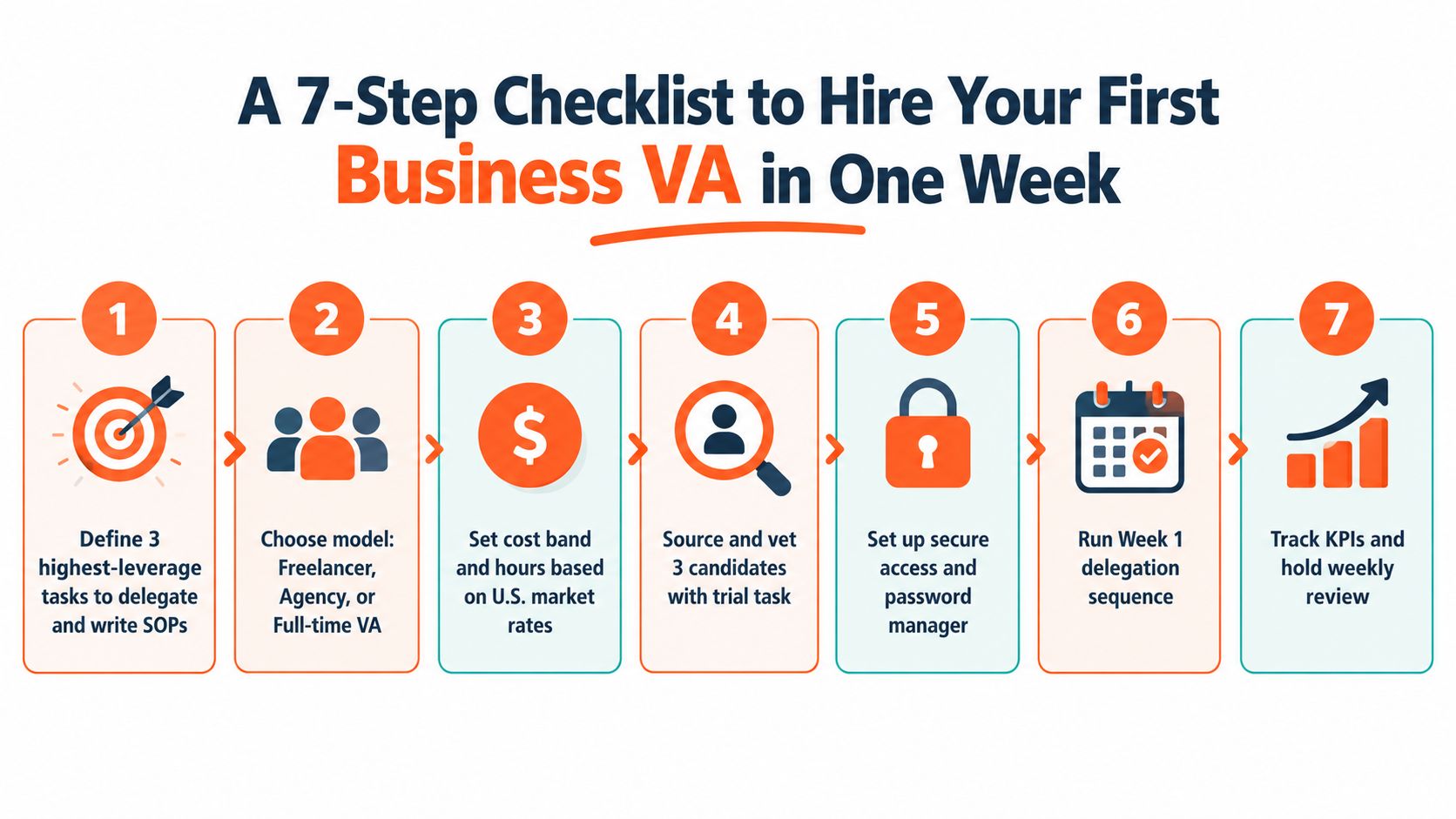
Run this process inside one week, but don't compress the judgment. Speed should come from preparation and a structured funnel, not from skipping verification.
Candidates who refuse paid trial work deserve scrutiny. Agencies that won't share the remote professional's name create an accountability problem. Anyone pushing to begin before both sides sign a written scope of work should be removed from the shortlist.
If the candidate needs help presenting administrative experience, a practical resource on how to write an admin cover letter can clarify the type of evidence you should expect in an application. For the employer side, focus on screening remote hires effectively, then document the decision.
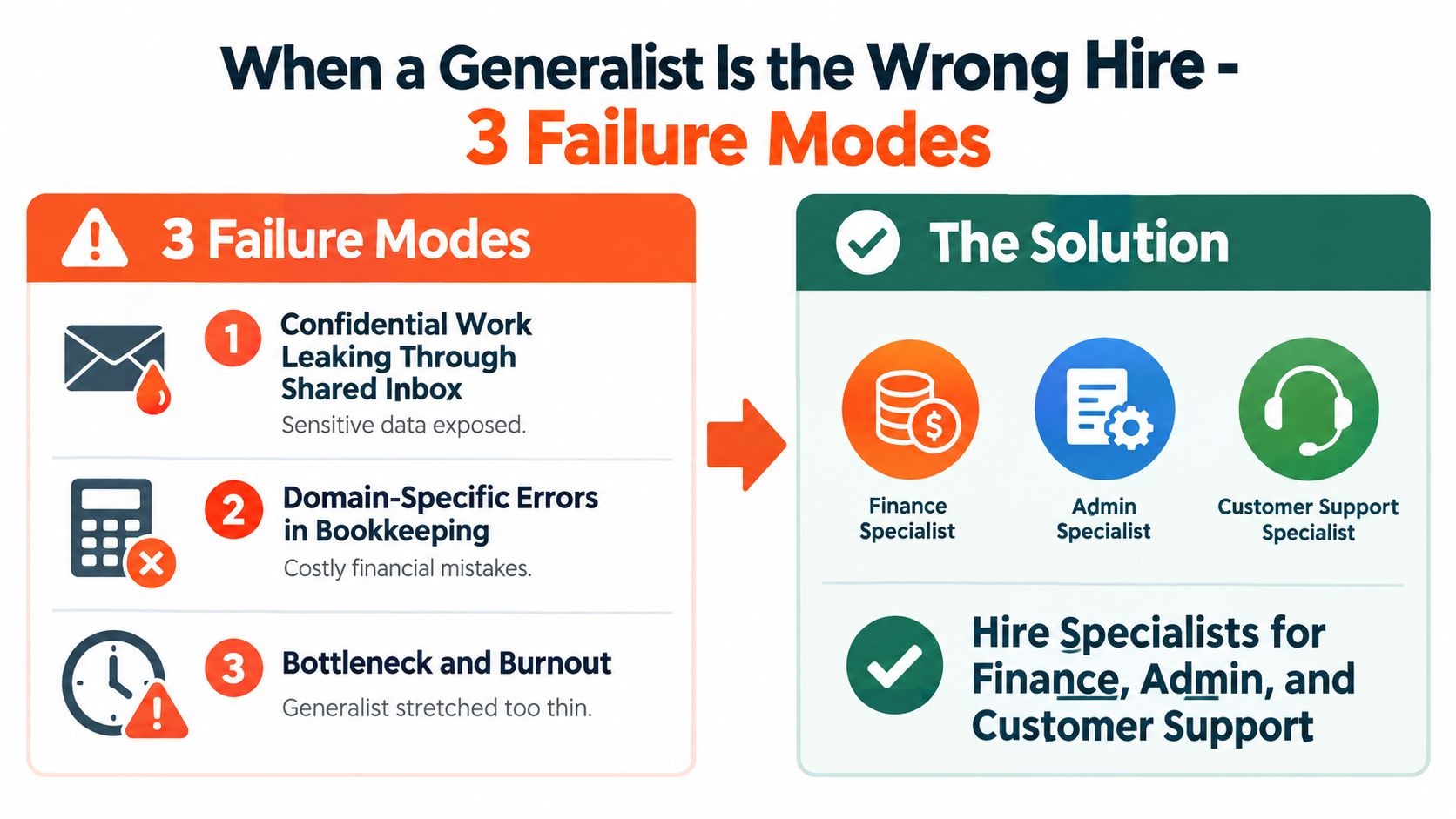
A generalist VA is useful when the work is broad, repeatable, and low risk. It becomes a bad hire when the company expects one person to manage confidential information, specialized judgment, and a board-level metric without clear ownership.
Confidentiality leakage happens when sensitive work runs through a shared inbox without proper access boundaries. The risk increases when customer, finance, legal, and HR messages all sit in the same queue.
Domain-specific errors compound. Bookkeeping mistakes can distort reports, while weak sales operations can corrupt CRM data and damage pipeline visibility. A generalist may complete the task while missing the domain rule that determines whether the output is correct.
Accountability disappears. If the VA touches marketing, support, finance preparation, and sales administration, no one may own the final result. The founder ends up checking everything, which defeats the reason for the hire.
A specialist can cost more per hour and still cost less per correct output. Hire a bookkeeper for reconciliations, an SDR for qualified prospecting, or a customer success operations specialist for escalation-heavy workflows. My decision rule is simple: if the task requires regulated knowledge, customer-facing judgment, or feeds a board metric, use a specialist or a managed role designed around that function.
Run a 30-day pilot before placing a generalist inside a critical workflow. Define the output, error tolerance, escalation policy, and review cadence. If the worker needs constant correction or can't explain exceptions, don't expand the assignment. Change the role before the workflow becomes dependent on a weak fit.
A written skills test, a paid two-hour trial, and a reference check are required for a role that will touch company systems. Add a live communication screen and role-specific assessment when the work involves customers, CRM accuracy, or financial preparation.
Compare the fully loaded U.S. cost against the nearshore hourly rate multiplied by 2,080 hours, then subtract the management overhead created by each option. A nearshore assistant from $7/hr costs under a third of the $22.86 median hourly wage for US secretaries and administrative assistants (BLS, May 2025), but treat the saving as a ceiling rather than a forecast, and run the arithmetic on the hours you are actually staffing. If the role is a 20-hour window, compare it against 20 hours of U.S. coverage, not against a full-time salary.
No. AI handles volume, classification, and first drafts. A VA handles triage, exceptions, follow-up, and stakeholder calls. The split that works in practice is to let the tools draft and classify, and to keep the assistant accountable for what actually ships: the exception nobody wrote a rule for, the follow-up that needs a second attempt, the customer who has to be called. Automation reduces the volume reaching a person. It does not decide what to do when the volume is wrong.
A nearshore managed provider can often reach first value in 5 to 7 days, freelance hiring commonly takes 2 to 4 weeks, and an in-house process can take 3 to 6 weeks. Use the seven-step checklist above to shorten the handoff without skipping the trial, access controls, or written scope.
Yes, if you can name three repeatable tasks and write down what “done” looks like for each. The test is not company size, it is whether the work repeats and can be documented. If you are spending more than five hours a week on administrative work that does not need your judgment, the role pays for itself before it is full-time. If you cannot describe the task without saying “it depends,” delegate something else first.
Yes, and it is the more common shape. Across the 25 business-VA roles opened through Virtustant in the first half of September 2026, 12 of the 23 that stated a schedule were part-time, most of them a fixed daily window such as 10am–2pm ET or 9am–1pm PT rather than a reduced week. Hire the window, not the headcount: define the hours you need covered in your own time zone, then price against that window.
Virtustant connects U.S. companies with vetted remote professionals across Latin America and handles sourcing, assessment, contracts, payroll, HR, and compliance through one consolidated arrangement. Scope a remote virtual assistant role around your tools, the U.S. time-zone window you need covered, and your first-month deliverables.