
How Do You Prioritize Work? 4 Frameworks for Managers Who Are the Bottleneck (2026)
October 8, 2026


How do you prioritize work when every request ends up on your desk? Start by fixing the default: a Business Agility Institute research snapshot (March 2024) found that 52% of business areas prioritize by "who shouts loudest." Then sort work by urgency and importance, score the larger bets, and hand off recurring work together with the right to make routine decisions. This guide gives managers four frameworks and one test that tells you how many hours to hand off.
The frameworks are the easy part. The hard part is the operating rhythm around them: one intake, shared scoring rules, written escalation thresholds, a weekly review, and a clear answer to "who decides this if I am not in the room?"
Personal productivity advice assumes you control your workload. Managers usually don't. They coordinate people, answer escalations, approve spending, protect customers, and trade off urgent work against work that prevents the next fire. When everything routes through one person, the to-do list is not the problem. The decision queue is.
The load is measurable. Training magazine's 2025 outlook quotes meQuilibrium's State of the Workforce Report: managers experience nearly 40 percent higher quantitative demands than non-managers and 59 percent higher emotional strain. The reported manager workload findings describe a capacity problem, not a failure to keep a tidy list.
Without agreed criteria, volume wins. In the Business Agility Institute snapshot, 52% of business areas prioritize based on "who shouts loudest," while 29% use the KPIs of the requesting business area and 23% use their own KPIs. Respondents could pick more than one approach, and the snapshot draws on two global surveys (115 individuals and 215 organizations). The research snapshot points to a structural weakness: escalation pressure becomes the operating system.
A better filter asks four questions of every request:
Practical rule: A request's volume and urgency are not evidence of its value.
The fix is not working faster. It is reducing the number of decisions that reach you. Teams that want to boost workplace productivity that lasts redesign the flow of work instead of asking managers to sprint.
No single framework answers every priority question. Two are triage tools, one is a scoring model, and one is an alignment language. Problems start when a team uses a daily sorting method to make portfolio decisions, or builds a scoring spreadsheet to decide whether a routine request should be handed off.
The Eisenhower Matrix sorts work on two independent attributes, urgency and importance. Its four action categories are:
It survives chaos because every quadrant produces a next action. Its weakness is subjectivity: if every stakeholder request gets labeled "important," the matrix becomes a decorated to-do list. For a manager who is the bottleneck, the most useful quadrant is the third one. It is the only one that creates capacity instead of just ordering it.
RICE gives competing projects a comparable score from Reach, Impact, Confidence, and Effort. The formula is (Reach × Impact × Confidence) / Effort, and Atlassian's Confluence guide suggests ranking the three factors other than Reach on a 1 to 5 scale for consistency. The framework's documented mechanics help teams compare initiatives that touch different groups or need different investment.
Confidence keeps optimism in check. One practical framework scores it as 100% for high confidence, 80% for medium, and 50% for low, so weakly supported ideas lose ground.
Example inputs (illustrative): Initiative A reaches 400 customers a quarter, impact 3, confidence 80%, effort 2 person-weeks: 400 × 3 × 0.8 ÷ 2 = 480. Initiative B reaches 1,000 customers, impact 1, confidence 50%, effort 4 person-weeks: 1,000 × 1 × 0.5 ÷ 4 = 125. A wins despite smaller reach. RICE breaks down when people assign numbers without shared definitions, so write the scale down before anyone scores.
MoSCoW sorts scope into Must have, Should have, Could have, and Won't have. Atlassian's product-management guide frames it around return on investment: Musts are needed for the project to succeed, Shoulds matter but are not necessary, Coulds are nice to have, and Won'ts are not a priority this round. "Won't" matters as much as "Must," because a priority system needs an explicit boundary.
Its failure mode is inflation. When every stakeholder calls their item a Must, the category stops signaling scarcity. Ask what happens if the item moves, who owns that consequence, and which commitment it displaces.
The same Atlassian guide describes a 2x2 with value on one axis and effort on the other: do first (high value, low effort), do second (high value, high effort), do last (low value, low effort), and avoid (low value, high effort). It is RICE without the arithmetic. Use it in a 15-minute weekly scoring session when the items are too small to justify a full RICE score.
| Framework | Best for | Output | Failure mode | Cadence |
|---|---|---|---|---|
| Eisenhower Matrix | Daily triage and interruptions | Do, schedule, delegate, delete | Everything labeled "important" | Daily |
| RICE | Competing projects and initiatives | A ranked score | False precision, undefined scales | Monthly or quarterly |
| MoSCoW | Scope and stakeholder alignment | Must, Should, Could, Won't | Every item becomes a Must | Per launch or planning cycle |
| Value vs. Effort | Small items, fast weekly calls | Do first, do second, do last, avoid | "Value" left undefined | Weekly |
The practical stack is layered: MoSCoW sets scope boundaries, RICE ranks the big bets, Value vs. Effort handles the weekly small stuff, and Eisenhower manages whatever lands unexpectedly. To tie the whole stack to goals, The OKR Hub's prioritization framework uses a simple test: if a backlog item cannot be linked to a current Key Result, it stays out of the active backlog.
A framework fails when it depends on your memory. A repeatable loop turns incoming requests into visible decisions, protects capacity, and gives the people around you enough context to act without sending every question back to you.
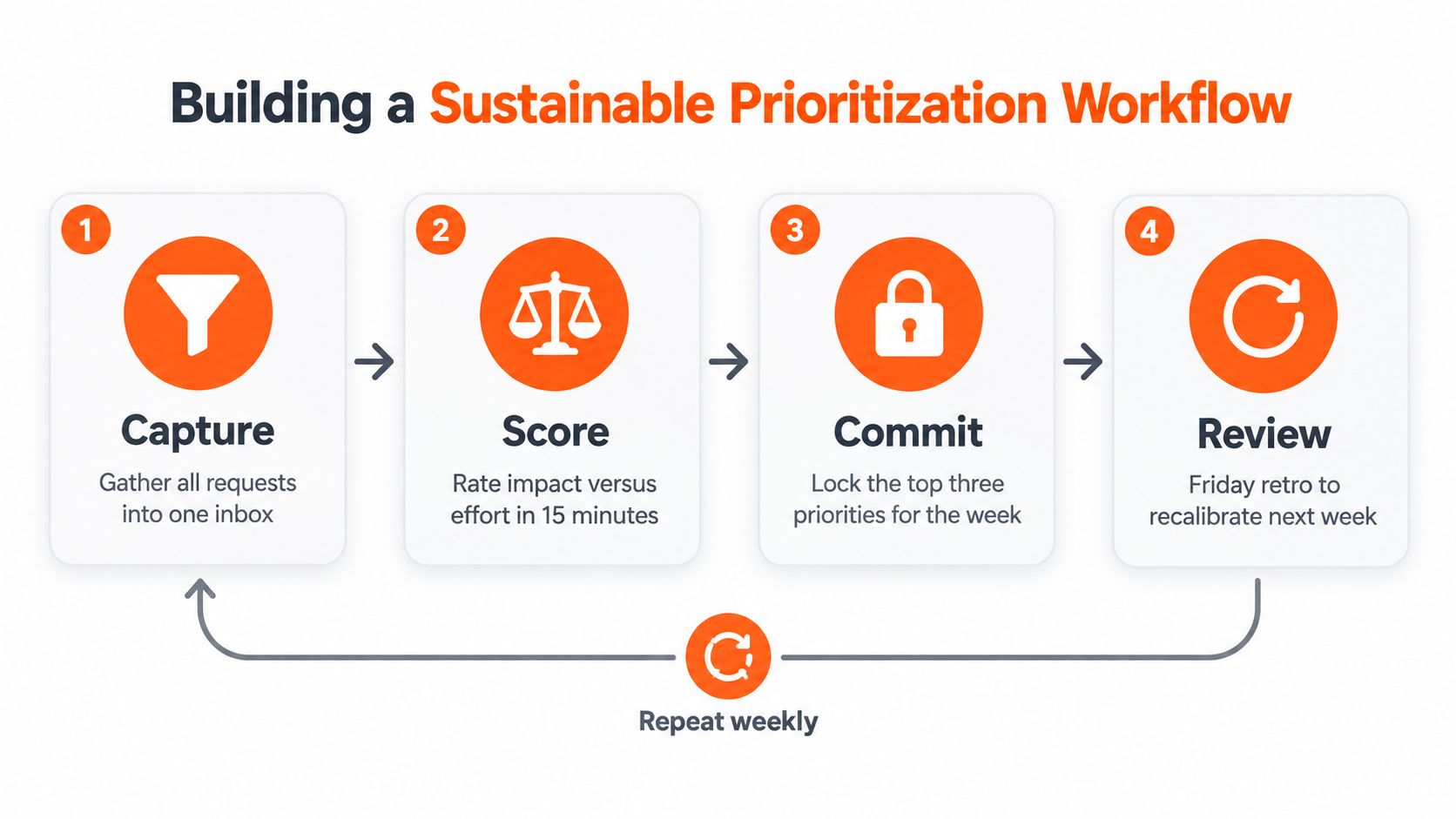
1. Capture everything in one place. One intake for requests, defects, client needs, hiring tasks, and internal fixes. Keep the form short but require a requester, desired outcome, consequence of delay, and owner. Redirect private messages into the same system, or your memory becomes the backlog.
2. Score against shared rules. Hold a short weekly scoring session. Record impact, time sensitivity, risk, effort, and owner for each item. Write the rules once, put them where requesters can read them, and log why a priority changed. The source research is a reminder that without written criteria, the most persistent stakeholder sets the agenda.
3. Commit and define escalation. Commit only to what fits capacity. One simple rule: lock a top three for the week. When a new priority enters, name what leaves. Write escalation thresholds in advance. A teammate resolves routine customer issues alone; you handle contractual exceptions, pricing exceptions, and strategic relationship risk. Distributed teams need the same clarity across time zones. Virtustant's approach to LATAM remote staffing covers coordinating remote work without routing every decision back to the manager.
4. Review what the system taught you. End the week by looking at finished work, deferred work, interruptions, and decisions that escalated without needing to. Delete requests that no longer matter and fix the scoring guide where the team keeps misjudging a category. This review is also where you run the test below.
The Eisenhower Matrix tells you to delegate Quadrant 3 (urgent, not important). It does not tell you how much Quadrant 3 you have, or whether it is enough to justify help. The Delegate-Quadrant Hours Test answers both in one week.
How it works:
| Example task (illustrative week) | Hours | Quadrant | Decision right |
|---|---|---|---|
| Inbox triage and routine replies | 4.5 | Q3 | Decide within rules |
| Scheduling and rescheduling meetings | 3.0 | Q3 | Decide within rules |
| Customer follow-up emails | 3.0 | Q3 | Decide within rules |
| CRM updates and data entry | 2.5 | Q3 | Execute only |
| Travel booking within policy | 1.5 | Q3 | Execute only |
| Pricing exception for a key account | 1.0 | Q1 | Escalate (yours) |
| Next quarter's hiring plan | 2.0 | Q2 | Keep (yours) |
Arithmetic (example inputs): 4.5 + 3.0 + 3.0 + 2.5 + 1.5 = 14.5 hours a week of Quadrant 3 work that someone else could own. The pricing exception and the hiring plan stay with you.
| Quadrant 3 hours per week | Move | Why |
|---|---|---|
| Under 10 | Batch, template, or automate | Too little for a dedicated person; fix the process first |
| 10 to 20 | Part-time assistant (20 h/week) | Enough recurring work to fill a steady half-time role |
| 20 or more | Full-time assistant (40 h/week) | Part-time hours would leave Quadrant 3 work on your desk |
At 14.5 hours, the example lands in the part-time band. A 20-hour role leaves 20 − 14.5 = 5.5 hours for Quadrant 2 support you never get to, such as research and meeting prep. Two rules keep the test honest: count only hours you would actually let go of, and rerun it after a month, because Quadrant 3 grows back when nobody owns it.
To check which tasks land in Quadrant 3 in practice, we read the job briefs behind Virtustant's most recent executive assistant and virtual assistant searches: the 24 most recent EA searches (opened July 30 to October 8, 2026) and the 23 most recent VA searches (opened September 15 to October 5, 2026). Duplicates and Virtustant's own open-application postings were removed. A brief can name several categories.
| Task category named in the brief | EA searches (n=24) | VA searches (n=23) | All (n=47) |
|---|---|---|---|
| Calendar and scheduling | 21 | 11 | 32 |
| Customer or client communication | 8 | 12 | 20 |
| CRM updates and data entry | 9 | 10 | 19 |
| Inbox management | 11 | 5 | 16 |
| Project and task coordination | 10 | 5 | 15 |
| Travel | 9 | 1 | 10 |
| Research | 3 | 6 | 9 |
| Bookkeeping, invoicing, or billing | 2 | 5 | 7 |
| Social media | 2 | 2 | 4 |
| Part-time schedule | 12 | 15 | 27 |
Three things stand out. Calendar work is close to universal on the EA side: 21 of the 24 most recent EA searches asked for it. Inbox management shows up in 11 of 24 EA searches but only 5 of 23 VA searches, which fits the test above: inbox triage needs "decide within rules" authority, and these briefs put that work with an EA far more often than with a VA. And 27 of the 47 searches were part-time, which is where most managers who run the test will land.
For a longer list of what to hand off, see these virtual assistant tasks, or the walkthrough on how to hire a virtual executive assistant.
Delegation fails when a manager hands over execution but keeps every decision. The new hire completes a step, then asks for approval. Coordination goes up, you are still the queue, and the team concludes that delegation "doesn't work."
The fix is to delegate a recurring decision with boundaries: what the person owns, what standard they apply, which exceptions escalate, and how often they report. "Schedule my meetings" is execution. "Accept any internal meeting that fits my focus blocks and decline anything without an agenda" is a delegated decision.
A virtual assistant can absorb this kind of recurring administrative and communication work, but the operating design decides whether your load actually drops. Adding a person without transferring decision rights just creates another inbox.
Some Quadrant 3 work should go to software, not a person. Rank candidates by business impact, repetitiveness, error cost, and how much human judgment the task needs.
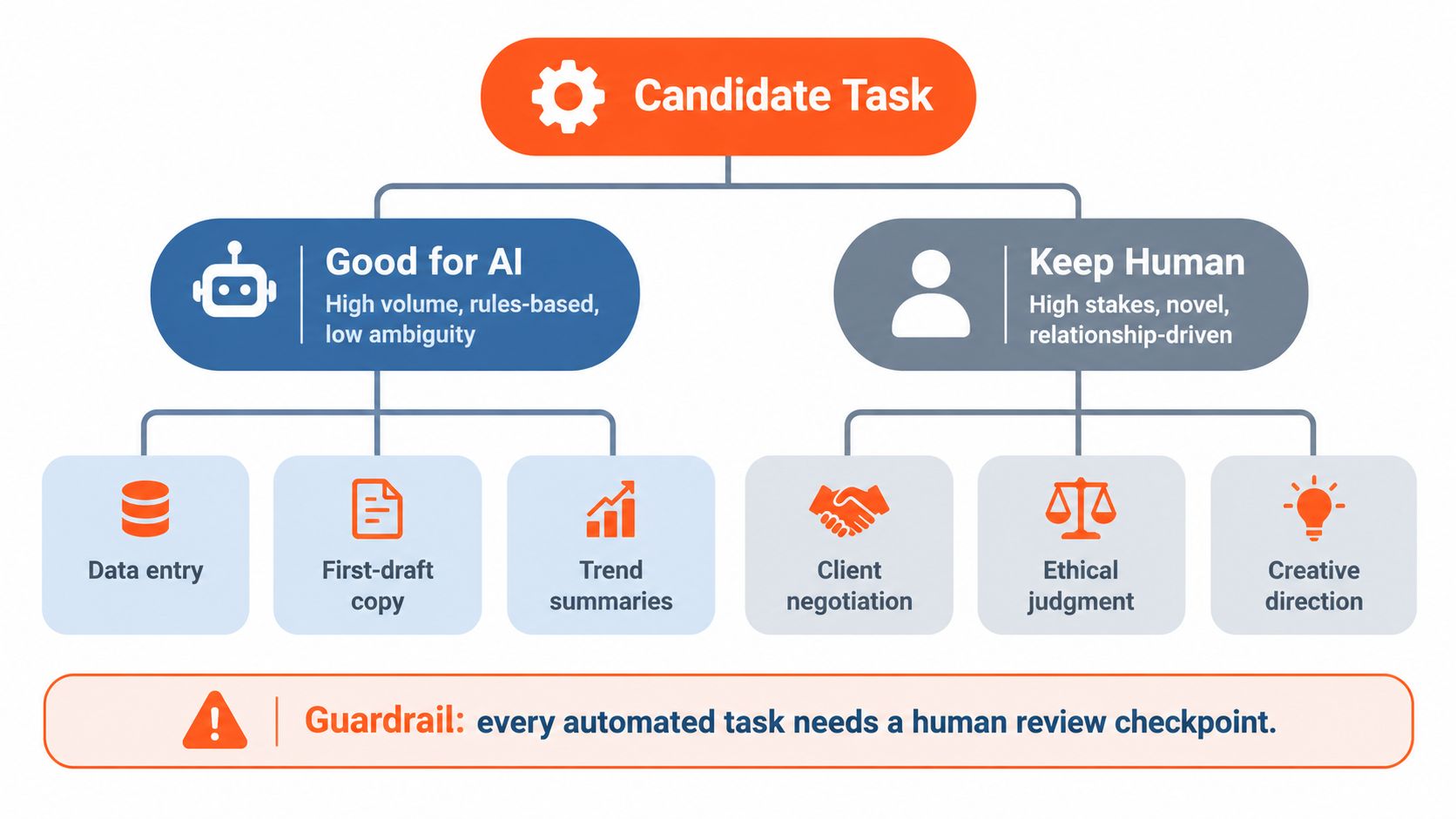
Workers are open to it, selectively. A Stanford study (a July 2025 preprint) surveyed 1,500 workers across 104 occupations: 69.4% welcomed automation that would free up time for higher-value work. But when the researchers mapped how companies actually deploy AI, 41% of tasks landed in the "Low Priority" and "Red Light" zones, where workers don't want automation or the technology can't yet do the job well. The study's findings support a selective approach: automate repetitive friction, not judgment.
Every automation needs an owner, a review checkpoint, and a rollback path. Often the owner is the assistant you just hired. For more on where AI fits, see this guide to AI in the workplace.
Prioritization loses value when your calendar fragments the work that matters most. Reserve decision blocks for Quadrant 2 work, batch routine approvals, silence non-critical alerts, and make requesters use the intake instead of interrupting you. The goal is not silence. It is making sure interruptions reflect real priority rather than convenience.
Measure the system by outcomes, not activity:
Review the numbers weekly, then create performance dashboards remotely so a distributed team can see progress without another status meeting.
If the test says part-time, here is the arithmetic for a 20-hour week (52 weeks ÷ 12 months):
| Role and rate | 20 h/week, monthly | 40 h/week, monthly |
|---|---|---|
| Executive assistant, from $8.50/hr all-in | $8.50 × 20 × 52 ÷ 12 = $736.67 | $8.50 × 40 × 52 ÷ 12 = $1,473.33 |
| Executive assistant, H1 2026 median $12.00/hr (n=24) | $12.00 × 20 × 52 ÷ 12 = $1,040.00 | $12.00 × 40 × 52 ÷ 12 = $2,080.00 |
| Virtual assistant, from $7/hr all-in | $7.00 × 20 × 52 ÷ 12 = $606.67 | $7.00 × 40 × 52 ÷ 12 = $1,213.33 |
| Virtual assistant, H1 2026 median $10.10/hr (n=24) | $10.10 × 20 × 52 ÷ 12 = $875.33 | $10.10 × 40 × 52 ÷ 12 = $1,750.67 |
The medians come from Virtustant's H1 2026 placement data (441 starts, January to June 2026). They are median client-side rate benchmarks per role, detailed in the 2026 nearshore rate report. Starting rates by role are on the pricing page.
Which role fits? If your Quadrant 3 list is mostly inbox, calendar, and travel with "decide within rules" authority, look at an executive assistant. If it is mostly execute-only work like data entry, scheduling, and customer follow-ups, a virtual assistant may cover it.
Virtustant is a remote staffing agency: you get a dedicated remote professional whose day-to-day work you direct. (New to the model? Start with what remote staffing is.) Shortlist in 48 hours. Start in 72 hours. Candidates come from the top 1% of applicants: of every 100 who apply, 22 pass the recruiter screen, 9 pass cognitive (IQ), skills and English testing, 3 reach a live interview, and 1 is hired. After the hire, an account manager is your main point of contact and coordinates onboarding, start date, tools access, and the first-week plan, and Virtustant follows up during the first weeks. You direct the day-to-day work; Virtustant handles payroll, paperwork, and everything administrative on the professional's side. There are zero placement fees, billing is month-to-month with one weekly invoice per placement, and every placement carries a lifetime replacement guarantee with no time cap.
Run the test this week. If your Quadrant 3 total is over 10 hours, book a call about an executive assistant and bring your log: it is the job description.
Separate urgency from importance with the Eisenhower Matrix: do urgent and important work now, schedule important work that is not urgent, delegate urgent work that is not important, and delete the rest. Then write escalation thresholds so fewer items reach you in the first place.
Use more than one. The Eisenhower Matrix handles daily triage, RICE ranks competing projects with (Reach × Impact × Confidence) / Effort, MoSCoW aligns stakeholders on scope, and a Value vs. Effort 2x2 handles small items in a quick weekly session.
The Eisenhower Matrix sorts individual tasks by urgency and importance and tells you what to do next with each one. RICE scores larger initiatives so you can compare projects that differ in reach, impact, confidence, and effort.
Start with recurring Quadrant 3 work: calendar and scheduling, inbox triage, travel, CRM updates, and routine customer follow-ups. In Virtustant's 24 most recent executive assistant searches, opened July 30 to October 8, 2026, 21 asked for calendar or scheduling work and 11 for inbox management.
Under the Delegate-Quadrant Hours Test, fewer than 10 hours a week of Quadrant 3 work points to batching or automation, 10 to 20 hours points to a part-time assistant at 20 hours a week, and 20 hours or more points to a full-time assistant.
At Virtustant's starting rate of $8.50 an hour all-in, 20 hours a week costs $8.50 × 20 × 52 ÷ 12 = $736.67 a month. At the H1 2026 executive assistant median of $12.00 an hour (n=24), the same schedule is $1,040.00 a month.
Choose an executive assistant when the work needs judgment within rules, such as inbox triage and calendar trade-offs for a senior leader. Choose a virtual assistant when the work is mostly execute-only, such as data entry, scheduling, and routine customer follow-ups. Virtual assistants start from $7 an hour all-in at Virtustant.
You get a shortlist of 3 to 5 vetted candidates within 48 hours of your first call, and your hire can start in 72 hours.

