How to Hire a Remote Customer Support Specialist: A 2026 Playbook
October 1, 2026


To hire a remote customer support specialist, size the coverage hours first, then set the budget, then test candidates on real tickets. Fully remote support jobs are rare: in Q2 2026 only 2% of U.S. administrative and customer support job postings were fully remote, versus 93% fully on-site and 5% hybrid, according to Robert Half's remote-work analysis. In Virtustant's H1 2026 placement data (441 starts, January to June 2026), the median client-side rate for customer service roles was $10.83/hr all-in (n=12).
This playbook is for the employer side: a U.S. company that needs someone to cover the right hours, write clean replies and escalate the right cases. It includes the Coverage-Hour Budget, our method for sizing seats and a maximum rate.
A remote customer support specialist answers customer questions by email, chat, phone or in-app messaging from outside your office, documents every case in your helpdesk, and escalates defects, refunds and account risks to the right internal owner. Ticket skill matters, but it is rarely what breaks a remote hire. Hours are.
Picture a U.S. SaaS team whose "remote" support generalist works from Bali. Friday evening Eastern is Saturday morning there, so a Friday-night outage waits all weekend. The problem wasn't remote work. It was unmanaged coverage.
So the first question isn't "Can this person work remotely?" Ask instead: Which hours must a qualified agent actively staff, and what happens when the queue exceeds capacity? The answer decides the seat count, the schedule and the hiring geography.
| Coverage shape | How it works | Best fit |
|---|---|---|
| Full overlap | The agent works through the core U.S. operating window. | High-touch B2B queues, live chat, strict business-hour SLAs |
| Partial overlap | The agent overlaps with the U.S. team for a defined part of the day. | Email support, routine tickets, documentation-heavy work |
| Follow-the-sun | Different people hand off the queue across time zones. | Global products, continuous intake, urgent technical triage |
| Weekend bridge | The agent owns a defined weekend block and hands off before Monday. | Outage monitoring, account-sensitive support, backlog prevention |
Virtustant first-party search data: the 25 most recent searches titled "customer service" plus the 6 titled "customer support" opened between 25 May and 23 Sep 2026, 31 searches in total, 28 of which stated a schedule. Shares below are of those 28.
| What the schedule said | Searches | Share of 28 |
|---|---|---|
| Set in a U.S. time zone | 27 | 96% |
| Eastern Time | 18 | 64% |
| Pacific Time | 6 | 21% |
| Central or Mountain Time | 3 | 11% |
| A full business day (8 or more hours a day) | 22 | 79% |
| A short daily block (2 to 4 hours a day) | 6 | 21% |
| Weekend or Saturday hours required | 3 | 11% |
Buyers anchor the seat to their own clock: 27 of 28 schedules used a U.S. time zone (the exception was European), and the default is a standard workday, usually 9 to 5 Eastern. Weekends are the exception: only 3 of 28 asked for them, so if you need Saturdays or Sundays, put it in the first line of the brief.
Most support hiring starts with a title and a salary guess. The Coverage-Hour Budget starts with the queue and works backward to the rate you can afford, in four steps.
Worked example. The midpoint of the monthly budget U.S. companies stated when opening customer service searches with Virtustant was $1,648 (n=22 companies, searches opened through 23 Sep 2026, 21% part-time). Here is what that budget buys:
| Seat plan | Weekly hours | Monthly hours (× 4.33) | Cost at the $10.83 median | Max rate on a $1,648 budget |
|---|---|---|---|---|
| One 20-hour seat | 20 | 86.6 | $937.88 | $19.03/hr |
| One 40-hour seat | 40 | 173.2 | $1,875.76 | $9.52/hr |
| 40 + 20 (9 a.m. to 9 p.m. ET) | 60 | 259.8 | $2,813.63 | $6.34/hr |
At $19.03/hr, a 20-hour seat sits well above the $10.83 median, so you can ask for phone, bilingual or technical skills. At $9.52/hr, a 40-hour seat sits above the $7.00/hr floor but below the median: workable for a simple email queue, tight for anything harder. At $6.34/hr, the 60-hour plan falls below the $7.00/hr floor where Virtustant rates start, so the budget, not the candidate pool, is the constraint: fund the second seat or cut the evening block.
The arithmetic: 20 × 4.33 = 86.6 and $1,648 ÷ 86.6 = $19.03. 40 × 4.33 = 173.2 and $1,648 ÷ 173.2 = $9.52. 60 × 4.33 = 259.8 and $1,648 ÷ 259.8 = $6.34. At the median, 86.6 × $10.83 = $937.88, 173.2 × $10.83 = $1,875.76, and 259.8 × $10.83 = $2,813.63.
Virtustant first-party placement data, H1 2026 cohort (441 placement starts, 1 Jan to 30 Jun 2026): the median client-side rate for customer service was $10.83/hr all-in (n=12), and $9.65/hr for the customer service representative title (n=9). Rates start at $7.00/hr all-in. There is no single median across roles: role medians in the cohort range from $9.00/hr (dispatcher) to $12.41/hr (SDR/BDR).
For a U.S. comparison, the median hourly wage for customer service representatives was $21.53 in May 2025, per the Bureau of Labor Statistics. That is a wage only, before payroll taxes, benefits and recruiting, while the $10.83 Virtustant median is a client-side, all-in rate benchmark.
Where a role lands above the $7.00/hr floor depends on the brief: phone work, bilingual service, technical depth and weekend hours all narrow the pool. For current rates by role, see Virtustant pricing, or review the hire remote customer service reps page for what the seat includes.
Write the operating brief before you post the role. Start with the queue, not the title. Record weekly ticket volume, the share arriving by email, chat, phone and in-app, the product areas that generate the most confusion, and the exact conditions that require escalation.
Then define the shift in operational terms: the window in one U.S. time zone converted to the candidate's local time, the weekend rotation, holiday coverage, and on-call expectations. If there is no on-call requirement, say so; ambiguity creates unreliable scheduling.
Your English requirement should describe observable performance. Our recommendation is written C1 as the minimum, plus clear, easily understood spoken English for voice work. Test both with a short writing sample and a 90-second role-play.
| Input | Example value |
|---|---|
| Ticket volume | Weekly queue with clear seasonal spikes |
| Channel mix | Email and in-app first, chat during core overlap |
| Product complexity | SaaS billing plus basic integration troubleshooting |
| Escalations | Engineering for defects, finance for refunds |
| Shift | 9 a.m. to 5 p.m. Eastern, converted to local time |
| Language | Written C1, clear spoken English, tested live |
| Tools | Zendesk, Slack, HubSpot and the product console |
| Weekend work | Defined weekend bridge with a Monday summary |
Turn the table into the job description: mission, responsibilities, required skills, nice-to-haves (SaaS, bilingual, billing, knowledge-base writing), shift hours in both time zones, and a pay range checked against your Coverage-Hour Budget.
The hourly rate isn't the cost. The cost is the productive hour after recruiting, payroll, compliance, ramp time and replacement risk, so compare routes on who does that work.
| Route | Who finds and vets the person | Who handles contract and payroll | If it doesn't work out | Best for |
|---|---|---|---|---|
| Remote staffing agency | The agency | The agency, on the professional's side | Depends on the replacement terms; ask for them in writing | Teams that haven't found the person yet and want to start fast |
| Employer of record (EOR) | You | The EOR becomes the legal employer in the worker's country | You recruit again | Teams that already have a named candidate to keep long-term |
| Freelance marketplace | You, from platform profiles | A contractor relationship through the platform | You recruit again | Short projects or a time-boxed test |
| Direct hire via a local entity | You | You, under local labor law | You recruit again | Companies that already run HR in that country |
Our rule of thumb (a suggestion, not a benchmark) follows one question: who is going to find the person? If you haven't found anyone yet, start with an agency. If you already have a named candidate, an EOR keeps them compliant without a local entity. If the work is a short test, use a marketplace. Build a local entity only when you already run HR in that country.
With a marketplace, ask what keeps the contractor on schedule. With an EOR, read the term, notice and termination clauses before you commit. With any agency, ask how they test writing, run role-plays and check references, and what replacement actually covers, then compare the answers side by side.
For U.S. companies comparing providers, nearshore staffing for U.S. companies is the relevant category when time-zone overlap is the point, but the contract still needs careful review. If you are weighing whether to hand the whole function to a provider, start with the trade-offs of handing customer service to an outside team and how customer support providers compare.
Overlap is the main operational reason LATAM works for U.S. support teams. Wow Remote Teams, a nearshore staffing firm, says Latin America typically provides six to nine hours of daily overlap with U.S. Eastern Time and four to six hours with Pacific, as described in this nearshore staffing comparison. Our search data agrees: 27 of 28 schedules used a U.S. time zone.
If you are comparing agencies, this short video covers the questions to ask before you sign:
Résumé review is a weak predictor of ticket judgment. A candidate can list Zendesk, Salesforce and "customer empathy" without proving they can interpret a complaint, write a clean response, or choose the right escalation path. Use four stages, with a written record at every step:
Orbit AI candidate screening insights describe the pre-screen as a short, structured first conversation and a decision gate, not a deep evaluation: it confirms basics like work authorization, salary expectations and availability.
How narrow should the funnel be? Track your own pass rates instead of borrowing someone else's. For reference, here is Virtustant's vetting funnel across all roles, which is where the "top 1%" figure comes from:
| Stage | Share of applicants still in |
|---|---|
| Apply | 100% |
| Pass the recruiter screen | 22% |
| Pass skills and English testing | 9% |
| Reach a live interview | 3% |
| Hired | 1% |
That funnel is how Virtustant sends 3 to 5 vetted candidates within 48 hours; here is what a shortlisted candidate means and how to review one. For a broader operating model, document your vetting process for U.S. companies.
Use a rubric with anchored scores. Give separate marks for paraphrasing the customer's issue, acknowledging the impact, identifying the next step, documenting the case and choosing the correct escalation. Structured scoring beats gut feel because every interviewer evaluates the same evidence.
Red flags appear quickly: no paraphrase of the customer's problem, a hard sell or defensive explanation before the fix, a technical fix before acknowledging frustration, and a close that doesn't say who owns the next action or when the customer will hear back.
Test English live. Gold Penguin's guide to hiring support reps in Latin America says you need to hear candidates speak and read what they write under time pressure, and recommends a timed writing exercise plus a casual video conversation, as discussed in this LATAM hiring guide. If you need Spanish, test it the same way rather than trusting a résumé line.
eDesk's guide to remote agent productivity sets first-response benchmarks of under one hour for email and under one minute for live chat, and calls First-Contact Resolution arguably the strongest single indicator of agent effectiveness, as outlined in this remote support productivity guide. It also proposes a weighted composite score: FCR 30%, CSAT 25%, First Response Time 20%, resolution time 15% and SLA compliance 10%.
| KPI | Weight in eDesk's composite | Warning sign if pushed too hard |
|---|---|---|
| First-Contact Resolution | 30% | Agents avoid complex tickets to protect the rate |
| CSAT | 25% | Agents overpromise to secure a positive score |
| First Response Time | 20% | Canned replies that don't address the issue |
| Resolution Time | 15% | Tickets closed before the customer confirms the outcome |
| SLA compliance | 10% | Low-value tickets crowd out urgent cases |
| Tickets per agent | Not weighted | Shallow investigation and rising reopens |
Does remote work hurt those numbers? One industry roundup says it doesn't, in this remote support metrics summary: it cites Stanford research reported by Forbes that remote agents were about 13% more productive, Zendesk 2024 data showing remote reps handling 45 calls per shift versus 36 (25% more), and a 78% versus 66% First-Contact Resolution rate it does not tie to a named study. Treat those as reference points, not promises.
Pair each activity measure with a quality control: if tickets per shift rise while CSAT or FCR falls, inspect the workflow before you praise the volume.
Automation increasingly sits in front of the queue, in support and beyond. Vendors sell AI voice and chat for HVAC leads and similar front-door tools; Expressify's live chat page pitches a website chatbot that answers visitor questions, captures leads and provides 24/7 support. If you add a layer like that for intake and routing, keep it out of the agent's score unless the agent controls the workflow. If chat is the main channel, see how to staff a live chat queue. The operating principles in Virtustant's customer management playbook can help structure the management layer.
A new agent shouldn't own the live queue on day one. One wrong refund or missed escalation costs more than a slower ramp. The plan below is our suggested ramp, not a measured benchmark.
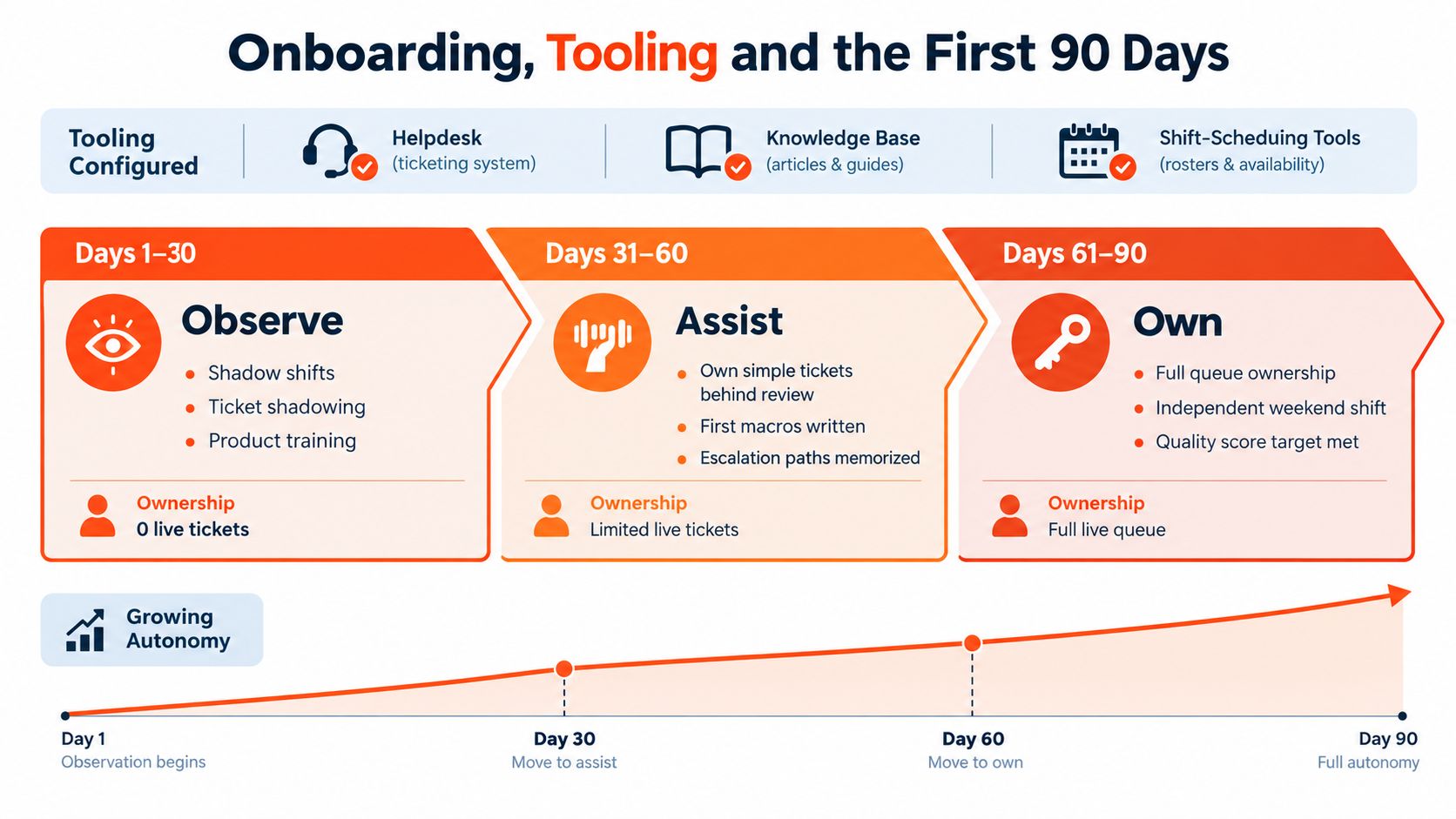
Days 1 to 30: observe. Shadow shifts, ticket shadowing, product training and knowledge-base review, with no live ownership. The goal is to learn customer language, macros and escalation boundaries.
Days 31 to 60: assist. Move to mentored tickets at roughly half of normal volume, with QA on every response. Require the agent to explain the intended resolution before sending sensitive billing, cancellation or technical replies.
Days 61 to 90: own. Move toward full volume, add an independent weekend shift where relevant, and reduce QA to a 10% sample once the agent consistently follows the rubric.
Provision everything before the first shift: a managed laptop, password manager, SSO and VPN where required, a helpdesk seat with macros and SLA rules, a QA platform such as Klaus or PlayVox, knowledge-base access and a visible shift calendar. Then run a 30-minute weekly 1:1, a Friday review of real tickets and a monthly calibration session.
Set explicit communication norms too. SnapDial's guide recommends separating real-time channels for complex problems from written updates for routine status, with one primary channel for urgent internal issues and one escalation path when a response is delayed. Its guidance on mastering remote team communication can help you formalize those rules.
Document the role as if the agent could leave tomorrow, and for a managed approach, compare the steps in remote onboarding by Virtustant.
If you hire through Virtustant, here is what happens after the hire. An account manager becomes your main point of contact and reaches out the same day to coordinate onboarding, the start date, tools access and the first-week plan. Virtustant follows up with you and with the professional during the first weeks to catch issues early. You direct the day-to-day work; Virtustant handles payroll, paperwork and everything administrative on the professional's side, and if it isn't working at any point, the lifetime replacement guarantee applies. Across 468 placements in the 12 months to 23 Sep 2026, the average was 11.2 days from opening a search to the professional's start date; see how long it takes to hire for the breakdown.
Don't open a job post until the first line is done.
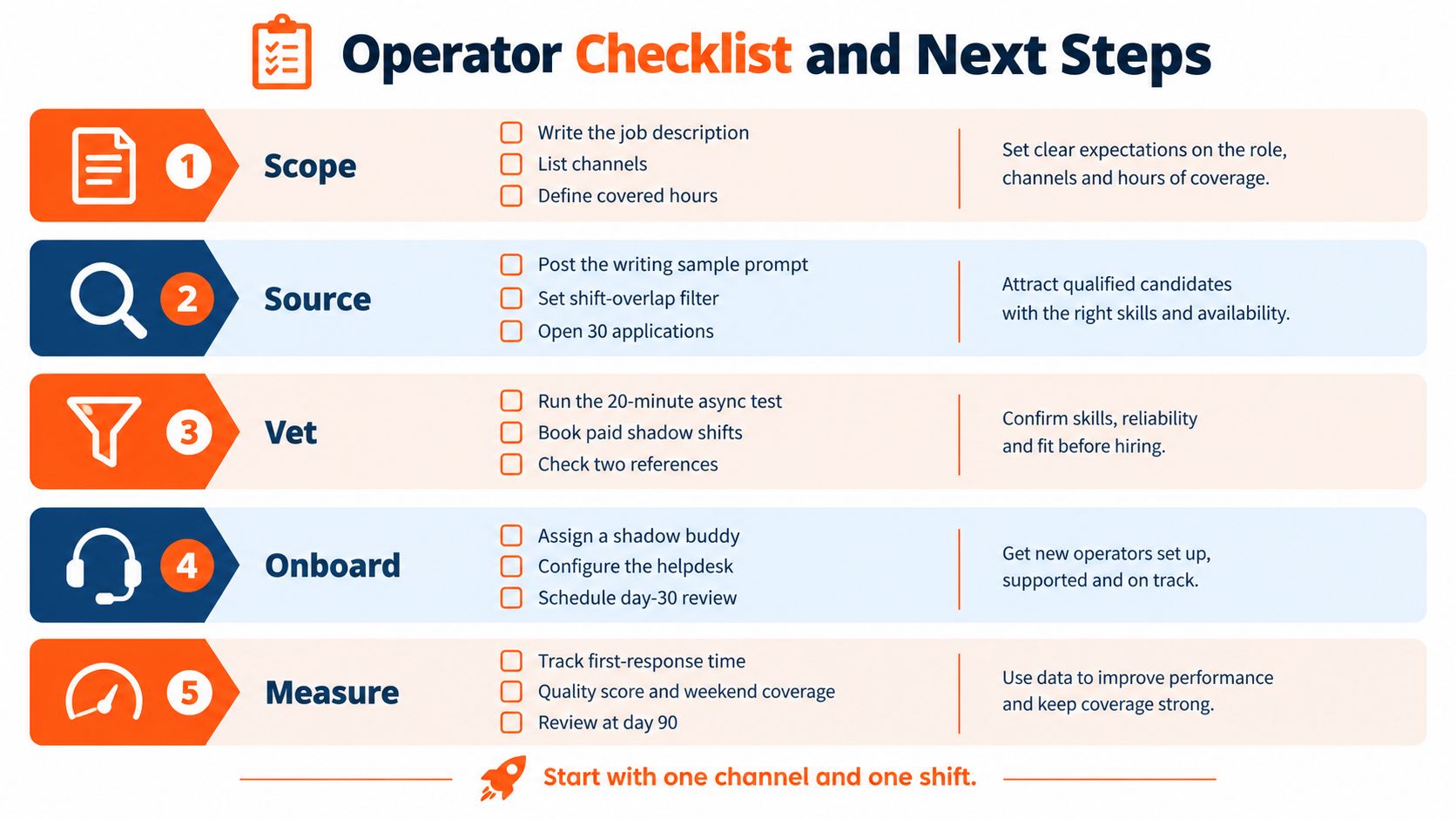
Watch for three failure modes in the first 60 days: vague scorecards, skipped QA and silent time-zone drift. The last one is the most dangerous, because the team keeps believing in coverage that no longer exists.
Start with coverage, not the title. Count the weekly hours you need covered in one U.S. time zone, split them into 20- or 40-hour seats, and set a maximum rate: monthly budget divided by weekly hours times 4.33. Then write the brief and vet with a writing sample, an async tools test, a live role-play and a final deep-dive.
In the Virtustant H1 2026 placement data (441 starts, January to June 2026), the median client-side rate for customer service was $10.83 per hour all-in (n=12). Rates start at $7.00 per hour. At the median, a 40-hour seat costs about $1,875.76 a month.
First Response Time, First-Contact Resolution, CSAT, Resolution Time and SLA compliance, with tickets per agent used only as a capacity signal. eDesk benchmarks first response at under one hour for email and under one minute for live chat, and weights FCR highest in its composite score at 30%.
Decide by who will find the person. If you have not found anyone yet, a remote staffing agency sources, vets and handles the paperwork. If you already have a named candidate, an employer of record keeps them compliant without a local entity. A freelance marketplace fits a short test.
Your customers' time zone, written into the brief. Of the 28 most recent Virtustant customer service and customer support searches with a stated schedule (25 May to 23 Sep 2026), 27 were set in a U.S. time zone and 18 in Eastern Time.
Yes. A 20-hour seat is a standard schedule, and six of the 28 recent Virtustant support searches asked for a 2- to 4-hour daily block.
Through Virtustant, you receive a shortlist of 3 to 5 vetted candidates within 48 hours. Across 468 placements in the 12 months to 23 Sep 2026, the average was 11.2 days from opening a search to the professional's start date.
Test it live. Ask for a timed writing sample on a real ticket and run a short role-play on a video call, and test Spanish the same way if the role needs it. Written C1 is a sensible minimum for ticket work, plus clear spoken English for phone queues.
Virtustant is a remote staffing agency that connects U.S. companies with vetted remote professionals in Latin America for customer support and other roles, full-time or part-time. You get a shortlist of 3 to 5 vetted candidates in 48 hours, zero recruitment fees, month-to-month terms and a lifetime replacement guarantee, while Virtustant handles the contract, payroll and paperwork on the professional's side. Visit Virtustant to discuss the coverage window and support profile you need, then turn this playbook into a staffed seat.